Stop re-listening. Ask all your recordings one question and see which one the answer came from.
Free: 300 minutes a month. Try a 3-minute recording without an account.
- Answers drawn only from your recordings, with the source named
- One-tap questions: quiz me, my action items, build a timeline
- Save any answer as Word or PDF, email it to yourself, or keep it as a note
Five lectures, one evening
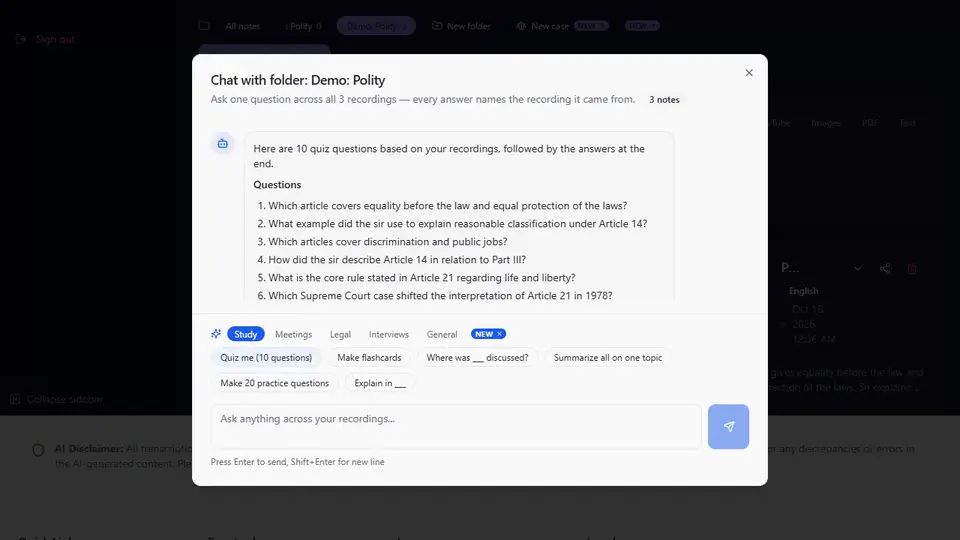
A student has five recorded polity classes and a test on Monday. Instead of replaying five hours, she opens the "Polity" folder, asks what was said about Article 21, then taps "Make 20 practice questions". The same works for a lawyer with a client folder of hearings, or a manager with a week of meetings. (An illustration of how the app works, not a real customer.)
Record → ask → get
1 · Collect
Record or upload as usual, then put related recordings in a folder — a subject, a client, a project. The free plan includes 2 folders; Pro has as many as you need.
2 · Ask
Tap "Chat with this folder", or select some notes and tap Chat. Type your question or pick a suggestion that fits the recordings.
3 · Get and keep
Read the answer with its sources. Copy it, save it as Word or PDF, email it to yourself, or keep it as a note next to your recordings.
Example
You ask: “What did sir say about Article 21, and in which class?”
Example answer: “Procedure must be fair, just and reasonable — Maneka Gandhi, 1978 (Source: Polity Lecture 3). Privacy is part of Article 21 — Puttaswamy, 2017 (Source: Polity Lecture 5).”
You ask: “Build a timeline”
Example answer: “3 Mar — witness says he saw the accused on 12 Jan (Source: Hearing 1). 17 Mar — in cross-examination he says 14 Jan (Source: Hearing 2). 20 Mar — client asks for an update (Source: Client call).”
You ask: “My action items”
Example answer: “Get the final price list from Anita — today (Source: Weekly meeting, 14 Oct). Send the launch email draft to Priya — Tuesday (Source: Launch sync, 13 Oct).”
Answers depend on what was said in your recordings. If something is not in them, chat says so.
See it in the app
 Pro
ProWorks across a selection or a whole folder
Pick two recordings or a full term. When a folder is too long to read in one go, hearlog uses the recordings most relevant to your question and tells you how many it used.
- Quiz me (10 questions)
- Make flashcards
- Where was ___ discussed, and in which recording?
- My action items
- What's still open?
- Draft a follow-up email
- Build a timeline
- List contradictions
- Pull exact quotes about ___
- Explain in ___
Chat comes with Pro, along with
- Chat with one recording, a selection, or a whole folder — answers name their sources.
- Files up to 2 hours (free: 100 minutes) and unlimited transcription (fair use) (free: 300 minutes a month).
- Up to 10 files at once, each becoming its own note.
- Text from photos, PDFs and YouTube videos, which you can then chat with too.
Pro is ₹2,990/year (2 months free) or ₹299/month in India ($49/year or $6.99/month elsewhere). The free plan stays free: 300 minutes a month.
Get Pro — ₹2,990/yearSee all 13 things Pro adds
- Chat with your recordings. Ask one recording, several, or a whole folder — every answer names the recording it came from.
- One-tap quiz, flashcards, action items, timeline. Tap once to turn your recordings into a quiz, flashcards, a list of action items or a dated timeline.
- Save a chat answer as Word or PDF, email it, or keep it as a note. Keep a good answer: download it, send it to your inbox, or save it next to your recordings. Answers in Indian scripts download as Word.
- Unlimited — fair use of 20 hours a month, more on request. Stop counting minutes: fair use covers 20 hours of recordings a month (free: 300 minutes) — more on request.
- Files up to 2 hours / 300 MB. Do the whole lecture, hearing or podcast in one go — free files stop at 100 minutes.
- Upload up to 10 files at once, a note for each. Drop a week of recordings in one go and get a finished note for each one.
- Text from a photo, scanned PDF or YouTube video. Turn a whiteboard photo, a scanned judgment or a captioned YouTube video into notes you can translate and summarise.
- Paste up to 50,000 characters to translate and summarise. Translate and summarise a whole chapter or report at once — free text stops at 5,000 characters.
- Email a meeting’s action items to up to 5 people. Send everyone their to-dos straight from the note — no copying and pasting.
- Download the original audio. Keep the recording itself to share or archive, next to its transcript and summary.
- As many folders as you need — including lawyers’ case folders. A folder for every course, client or case — free has 2.
- Case chat for lawyers — timelines, contradictions, client updates. Ask across a client’s hearings and calls: build a timeline, list contradictions, draft a client update.
- SRT subtitles (Pro). Download timed subtitle files (.srt) for your recordings: 4 hours a month.
hearlog organises and summarises what was said in your recordings. It does not give legal or medical advice.
Questions
Does chat use anything outside my recordings?
No. Answers are written only from the transcripts and summaries of the recordings you selected or the folder you opened. If the answer is not in them, chat tells you so instead of guessing.
How do I know where an answer came from?
Every point in an answer names the recording it came from — its title and date — so you can open that note and check the exact words before you rely on it.
Can I chat with a whole folder?
Yes. Open the folder and tap "Chat with this folder". If the folder is too long to read in one go, hearlog uses the recordings most relevant to your question and says how many it used.
Is chat free?
Chat is part of Pro, which is ₹2,990/year or ₹299/month in India ($6.99 or $49 elsewhere). Recording, transcripts, summaries, translation and up to 2 folders stay free on the free plan.
Is my data private?
Notes are stored encrypted at rest (AES-256, at the database level) and sent over HTTPS, and each account can open only its own notes. No meeting bot joins your calls — you record or upload yourself.
hearlog
Record or upload free — 300 minutes a month. Transcripts, notes and translation in 50+ languages.
Start freeStart with your next recording
Record or upload free, keep it in a folder, and ask it questions when you go Pro.
Try free — no card