Free AI transcription & translation · Hindi, Tamil, Telugu, Hinglish + 50 languages
Record it.
Read it in your language.
Ask it anything.
Record every class in Hindi, Hinglish or English. Clean notes the same evening — then ask all your lectures one question before the exam.
No card · no bot joins your call · try 3 minutes without an account
- 50+
- languages to transcribe and translate
- 300
- free minutes every month
- 0
- bots joining your calls
- 1 tap
- notes, quiz, email or translation
Example for Students. Live transcript in Hinglish: Toh Article 21 ka matlab sirf jeene ka haq nahi hai — dignity ke saath jeene ka haq hai. Translated to English: So Article 21 is not just the right to live — it is the right to live with dignity. Asked the folder Polity: What did sir say about Article 21, and in which class? Answer: Explained with the Maneka Gandhi case in Lecture 5. The right-to-privacy link came in Lecture 7. Sources: Lecture 5 · 12 Oct, Lecture 7 · 16 Oct.

Ask sample lectures one question — right here.
Pick sample recordings, tap a question, and see the answer with the recording each point came from. This is what chat does with your own lectures, meetings and hearings.
Example — you pick the Polity and Economics samples and tap "Key points for revision". The answer starts: "Article 21 guarantees that no person shall be deprived of his life or personal liberty except according to procedure established by law. (Source: Sample lecture: Polity — Article 21, 6 Oct 2026)"
1. Pick sample recordings
2. Tap a question — we ask every sample you picked
Answers come only from the samples you picked, and name the recording each point came from — exactly as chat works on your own recordings.
One app for the class, the case and the weekly meeting.
 Pro
ProStudents
Ask five lectures one question before the exam — and see which class said it.
See how it works for students →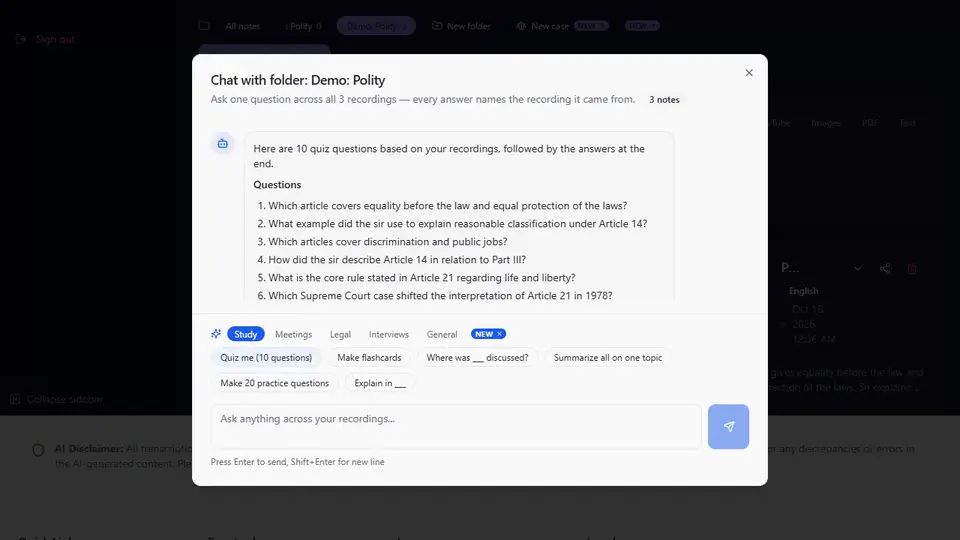 Pro
ProTeachers
Turn a class into lecture notes and a 10-question quiz for your students.
See how it works for teachers → Pro
ProMeetings
A week of meetings → your action items and the follow-up email.
See how it works for meetings → Pro
ProLawyers
A case folder of hearings and calls → a dated timeline you can check. Not legal advice.
See how it works for lawyers →Interviews
Ten interviews → who said what about the story, with exact quotes.
See how it works for interviews →Creators
A video → its transcript, then the description and chapters from it.
See how it works for creators →Written the way you actually speak.
- Every major Indian language — Hindi, Tamil, Telugu, Bengali, Marathi and more — plus 50+ world languages.
- Mixed speech stays mixed. A Hinglish class reads as it was said — Example: “Sir ne bola that Article 21 includes right to privacy.”
- Read it in your language. Translate any note into 50+ languages and keep the original in the same note — a Tamil client call as English notes, an English lecture explained in Telugu.
Powered by Google Gemini. Check names and numbers before you share — AI notes can make mistakes.
Free transcription in your language
Need text out of something right now?
A few free uses a day, no sign-up. Sign up free for whole files, summaries and chat.
Free for your notes. Pro when you want answers across all of them.
Pro is ₹2,990/year (2 months free) or ₹299/month ($49 / $6.99 outside India). Lifetime ₹4,999 / $299 once — available until 30 November 2026. Cancel monthly or yearly any time.
| You want to… | Free | Pro |
|---|---|---|
| Turn a lecture or meeting into a transcript and notes | ✓ 300 minutes a month | ✓ Unlimited (fair use) |
| Do a long lecture or hearing in one go | Up to 100 minutes per file | Up to 2 hours per file |
| Read it in your language (50+ languages) | ✓ | ✓ |
| Keep each course, client or case together | 2 folders | As many as you need |
| Ask one question across many recordings or a folder | — | ✓ answers name the recording |
| Text from YouTube, photos and PDFs in your notes | Free tools on /tools | ✓ |
| Drop a week of recordings at once | — | Up to 10 files |
See all 12 things Pro adds
- Chat with your recordings. Ask one recording, several, or a whole folder — every answer names the recording it came from.
- One-tap quiz, flashcards, action items, timeline. Tap once to turn your recordings into a quiz, flashcards, a list of action items or a dated timeline.
- Save a chat answer as Word or PDF, email it, or keep it as a note. Keep a good answer: download it, send it to your inbox, or save it next to your recordings. Answers in Indian scripts download as Word.
- Unlimited — fair use of 20 hours a month, more on request. Stop counting minutes: fair use covers 20 hours of recordings a month (free: 300 minutes) — more on request.
- Files up to 2 hours / 300 MB. Do the whole lecture, hearing or podcast in one go — free files stop at 100 minutes.
- Upload up to 10 files at once, a note for each. Drop a week of recordings in one go and get a finished note for each one.
- Text from a photo, scanned PDF or YouTube video. Turn a whiteboard photo, a scanned judgment or a captioned YouTube video into notes you can translate and summarise.
- Paste up to 50,000 characters to translate and summarise. Translate and summarise a whole chapter or report at once — free text stops at 5,000 characters.
- Email a meeting’s action items to up to 5 people. Send everyone their to-dos straight from the note — no copying and pasting.
- Download the original audio. Keep the recording itself to share or archive, next to its transcript and summary.
- As many folders as you need — including lawyers’ case folders. A folder for every course, client or case — free has 2.
- Case chat for lawyers — timelines, contradictions, client updates. Ask across a client’s hearings and calls: build a timeline, list contradictions, draft a client update.
Case folders for lawyers
Read more →NewFolders for each course, client or project — and (Pro) ask a whole folder one question
Read more →New · ProOne-tap questions in chat: quiz me, my action items, build a timeline
Read more →New · ProKeep the answers you get from chat
Read more →Everything you need to know about hearlog.
What is hearlog and what does it do?
hearlog turns your lectures, hearings and meetings into transcripts, notes and translations — built for Indian languages and mixed speech like Hinglish. Record or upload audio free (300 minutes a month) and pick one of five summary styles. With Pro you can ask one question across all your recordings, and pull text from a YouTube video's captions, an image or a PDF.
Is hearlog free? Is there a usage limit?
The free plan gives you 300 minutes of transcription every month, files up to 100 minutes each and 2 folders — no credit card needed. Your minutes reset each month. Deleting a recording does not restore used minutes. If you need more, hearlog Pro (₹299/month) is unlimited — fair use of 20 hours a month, more on request, with files up to 2 hours and as many folders as you need.
Is the chat demo on this page real?
Yes. The sample recordings are written by us and labelled "Sample". The suggested questions show answers our chat made once from those samples; your own question is answered live from the samples you pick (3 a day). On your own account, chat across recordings is part of Pro.
Which languages does hearlog support?
Every major Indian language — Hindi, Tamil, Telugu, Bengali, Marathi and more — plus 50+ world languages, including Hinglish and other mixed speech written the way it was spoken. Powered by Google Gemini.
Can hearlog transcribe a YouTube video?
Yes, on Pro, for videos that have captions. Paste a YouTube link and hearlog reads the video's captions (it does not listen to the audio), then summarises and translates the text. To try it without an account, use the free YouTube to text tool on /tools — a few free uses a day.
Can hearlog extract text from images and PDFs?
Yes, on Pro. Upload a photo of a printed page, a screenshot or a scanned document and hearlog pulls out the text, then translates or summarises it. The free tools on /tools do a short PDF or an image without an account.
Does a bot join my meetings?
No. You record in the browser or upload the audio yourself; nothing joins your call.
Does hearlog work offline?
Recording keeps going when the network drops: the audio is kept on your device and transcription finishes when your connection returns.
hearlog
Record or upload free — 300 minutes a month. Transcripts, notes and translation in 50+ languages.
Start freeYour next lecture or meeting, as notes you can ask.
Record or upload free — 300 minutes a month. With Pro, ask one question across all of them.